


Formal criteria
- Write SI prefixes, quantities, constants etc. in italics, but units not in italics.
- There must be a (non-breaking) space between number and unit.
- Smaller calculations may be included in the running text.
- Larger calculations and formulas that are central to the work are formatted in a separate line: centered or left-aligned. If they take up several lines, align them at a prominent point – e.g. the “=” – and add the formula number on the right.
- A formula editor can be used for formulas, e.g. in Microsoft Word.
- LATEX allows formulas to be typeset in the math environment.
- The package siunitx is helpful for this purpose.

Example of a formula
Here you see a formula typeset by LATEX using siunitx:

This formula was generated with the following code:
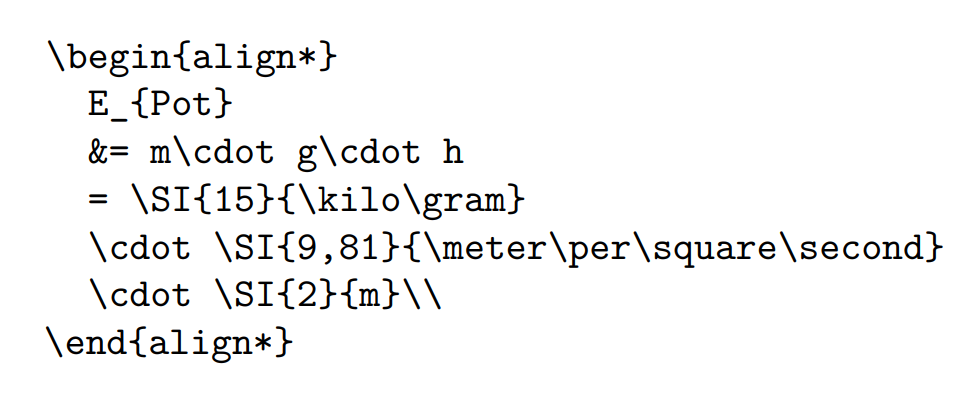

The formatting was set using the commands.

General notes
Note the following when inserting formulas and code:
- An overview of the mathematical functionalities of Microsoft Word 2016 can be found under: Mathematical Functionalities Microsoft Word 2016.
- In LATEX, the package “amsmath” allows for appealing mathematical typesetting.
- Program code can be displayed in LATEX with packages such as e.g. minted, listings, or syntax highlighting, and set apart from the text.
- Display program code in a monospace font – not as a screenshot from the editor, but in the running text.
- Smaller code excerpts may be included in the running text.
- Larger code excerpts should be set separately. Optional: line numbers, highlighting of keywords, variables, comments etc.
- In general, however, longer code sequences of more than 20 lines usually have no recognizable added value. Here, use omissions ([…]) if necessary and describe the code primarily semantically.

Typographic properties and typesetting
Italics: Used for commands, URLs, filenames, and directories.
Monospace: Used for options, switches, variables, attributes, types, and classes.
Italic Monospace: Shows text that should be replaced by values specified by the user.

Frequently asked questions
What should I keep in mind when formatting formulas?
Write SI prefixes, quantities, constants etc. in italics, units not in italics, and make sure there is a (non-breaking) space between number and unit.
Which programs can support me in embedding formulas?
For this, a formula editor can be used, e.g. in Microsoft Word. In LATEX, the siunitx package can be helpful.
Related Articles


Any suggestions for improvement? Write to us!
This article was published in September 2025 and last updated in November 2024.