


Initial situation

Modern software tools and mathematical editors support the creation and presentation of formulas and equations in professional quality.
A reference for meaningful formatting of formula symbols is provided by the standard DIN EN ISO 80000-1. This article follows this standard.

Specifying a quantity

For example, the volume can be specified according to Equation 1:

Here, V is the symbol for the quantity “volume”, cm3 is the unit of the volume, and 3.254 is the numerical value of the volume.

In general, any quantity Q can be expressed as the product of the numerical value of the quantity {Q} and the unit of the quantity [Q].
If only the numerical value of a quantity is needed – for example, to specify it in a chart or in the column heading of a table – the quantity must be divided by its unit, as shown in Equation 2:



Use of quantities in mathematical functions
Mathematical functions are defined only for numerical values or for quantities of the dimension number. Therefore, using a quantity with a different dimension as the argument of a mathematical function is not meaningful.
This can be done by specifying the unit or by using a standard quantity.
Examples of meaningful use of quantities in mathematical functions are shown in Equation 3:


Formula symbols for quantities
As a rule, formula symbols consist of letters from the Latin, Greek, or occasionally the Hebrew alphabet.

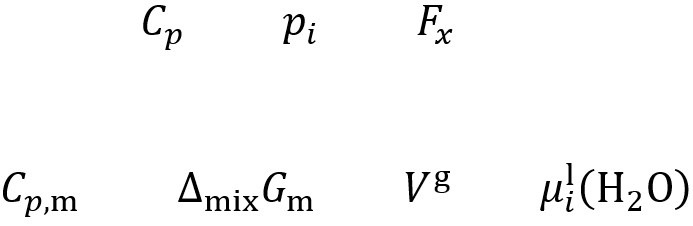
If formula symbols have indices, the formatting of the indices depends on their respective meanings.
- An index that represents another quantity or variable is written in italics, like the formula symbol.
- An index that represents a word, an abbreviation of a word, or a fixed number is written in upright type.
Equations 4 and 5 illustrate this for indices that must be italicized or upright, respectively:

Notation of unit symbols
Note that lowercase letters must be used for unit symbols (s, mol, m etc.).
An exception applies only to unit symbols derived from personal names (V based on Alessandro Volta, N based on Isaac Newton, °C based on Anders Celsius etc.).
A valid notation for the mass fraction of component A is, for example: wA = 23.15 %
In contrast, notations such as 23.15 wt. %, 23.15 m% or 23.15 %(m/m) are not permitted.
Reciprocal units are expressed using powers, e.g.: m s-1 or J mol-1, K-1.

Notation of chemical elements and compounds

Inserting formula symbols and equations in Word
Formulas and formula symbols can be inserted in Word using the Equation Editor: Tab – Insert, Group – Symbols, Command – Equation.
When using both an equation and equation numbering on the same line, make sure that Word does not interpret the equation as text.
If interpreted as text, this results in font size adjustments, especially for fractions, as shown in Equation 6:

You can avoid this automatic font size adjustment by inserting the equation into a table. In this case, the equation and the numbering must be in different cells, as shown in Equation 7:

For complex formulas, using MathType is also recommended, as it offers a wide range of tools for precise and professional presentation of mathematical expressions.
However, using MathType is complex and time-consuming. In addition, compatibility, export, or printing issues may occasionally occur with formulas created in MathType.
Therefore, for complex mathematical content, the scientific typesetting system LATEX is recommended, as it offers significant advantages over e.g. Microsoft Word – especially due to its powerful features and ability to create consistent, high-quality documents.
LATEX also offers the advantage of platform independence and is supported by a large, active community, which facilitates problem-solving and ensures long-term availability.

Frequently asked questions
Why is consistent formatting of formulas important?
A consistent format is particularly important to avoid misunderstandings and to ensure the traceability of calculations and experiments.
Which programs can support me with formatting?
For formatting mathematical formulas, LATEX is recommended, as it offers certain advantages over MathType and Microsoft Word.
Related Articles


This article was published in October 2025 and last updated in February 2025.